开源RISC-V处理器(蜂鸟E203)学习(一)修改仿真环境(vcs2018+verdi2018)
1.简述
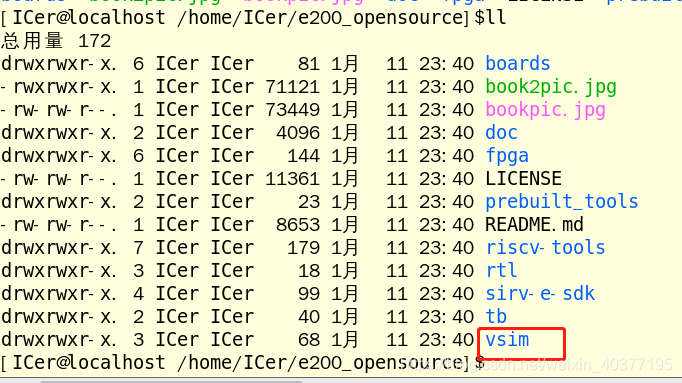
2.Git下载
git clone https://github.com/SI-RISCV/e200_opensource.git
git clone https://github.com/SI-RISCV/e200_opensource.git
3.修改环境
RUN_DIR      := ${PWD}

TESTCASE     := ${RUN_DIR}/../../riscv-tools/riscv-tests/isa/generated/rv32ui-p-addi
DUMPWAVE     := 1


VSRC_DIR     := ${RUN_DIR}/../install/rtl
VTB_DIR      := ${RUN_DIR}/../install/tb
TESTNAME     := $(notdir $(patsubst %.dump,%,${TESTCASE}.dump))
TEST_RUNDIR  := ${TESTNAME}

RTL_V_FILES		:= $(wildcard ${VSRC_DIR}/*/*.v)
TB_V_FILES		:= $(wildcard ${VTB_DIR}/*.v)

# The following portion is depending on the EDA tools you are using, Please add them by yourself according to your EDA vendors

SIM_TOOL      := vcs#To-ADD: to add the simulatoin tool
#SIM_TOOL      := iverilog # this is a free solution here to use iverilog to compile the code

SIM_OPTIONS   := -timescale=1ns/1ns -fsdb  -full64  -R  +vc  +v2k  -sverilog  -debug_all -P ${LD_LIBRARY_PATH}/novas.tab  ${LD_LIBRARY_PATH}/pli.a -l vcs.log +incdir+${VSRC_DIR}/core/+${VSRC_DIR}/perips/ #To-ADD: to add the simulatoin tool options

#SIM_OPTIONS   := -o vvp.exec -I "${VSRC_DIR}/core/" -I "${VSRC_DIR}/perips/" -D DISABLE_SV_ASSERTION=1 -g2005
  # This is a free solution here to use iverilog to compile the code. Please NOTE!!!!
  #
  # Note:
  #   Here we add a macro "DISABLE_SV_ASSERTION" to disable the system-verilog coded
  #     assertion in the RTL code because iverilog cannot support that syntax, if you
  #     use other EDA tools which support the systemverilog, you should not add this macro "DISABLE_SV_ASSERTION".
  #
  #   Here we didnt add macro "ENABLE_TB_FORCE"
  #     that macro was used to enable the random interrupt and bus-error insertion to make
  #           more intensive test in e200_opensource/tb/tb_top.v.
  #           Although the test become more intensive, the drawback is it makes the regression
  #           simulation running very slower, so by default now it is turned off.
  #           If you want to turn on them without caring the the regression speed,
  #           you can just add macro `ENABLE_TB_FORCE` here in command line.


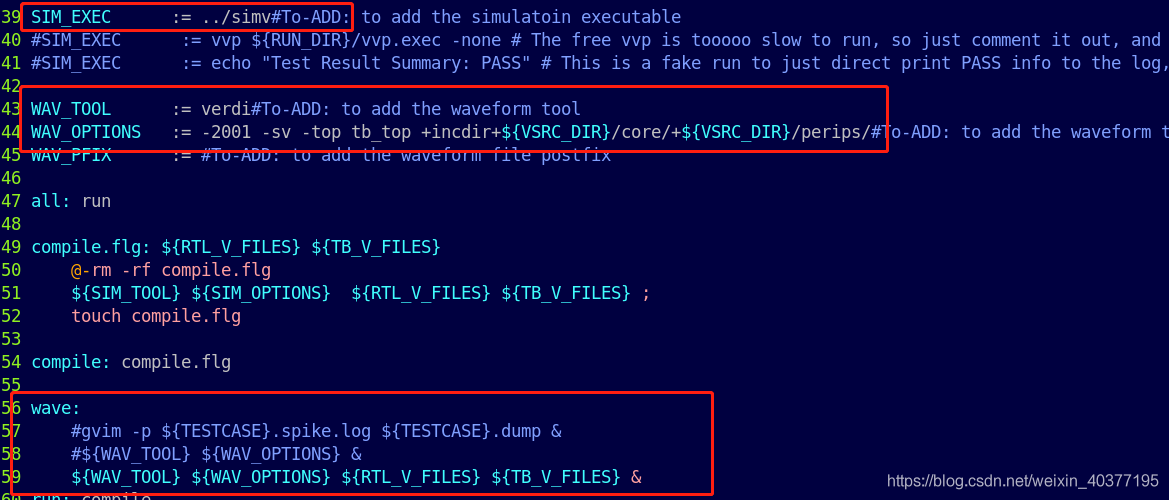
SIM_EXEC      := ../simv#To-ADD: to add the simulatoin executable
#SIM_EXEC      := vvp ${RUN_DIR}/vvp.exec -none # The free vvp is tooooo slow to run, so just comment it out, and replaced with the fake way below
#SIM_EXEC      := echo "Test Result Summary: PASS" # This is a fake run to just direct print PASS info to the log, the user need to actually replace it to the real EDA command

WAV_TOOL      := verdi#To-ADD: to add the waveform tool
WAV_OPTIONS   := -2001 -sv -top tb_top +incdir+${VSRC_DIR}/core/+${VSRC_DIR}/perips/#To-ADD: to add the waveform tool options
WAV_PFIX      := #To-ADD: to add the waveform file postfix

all: run

compile.flg: ${RTL_V_FILES} ${TB_V_FILES}
	@-rm -rf compile.flg
	${SIM_TOOL} ${SIM_OPTIONS}  ${RTL_V_FILES} ${TB_V_FILES} ;
	touch compile.flg

compile: compile.flg

wave:
	#gvim -p ${TESTCASE}.spike.log ${TESTCASE}.dump &
	#${WAV_TOOL} ${WAV_OPTIONS} &
	${WAV_TOOL} ${WAV_OPTIONS} ${RTL_V_FILES} ${TB_V_FILES} &
run: compile
	rm -rf ${TEST_RUNDIR}
	mkdir ${TEST_RUNDIR}
	cd ${TEST_RUNDIR}; ${SIM_EXEC} +DUMPWAVE=${DUMPWAVE} +TESTCASE=${TESTCASE} |& tee ${TESTNAME}.log; cd ${RUN_DIR};


.PHONY: run clean all


RUN_DIR := ${PWD}
TESTCASE := ${RUN_DIR}/../../riscv-tools/riscv-tests/isa/generated/rv32ui-p-addi
DUMPWAVE := 1
VSRC_DIR := ${RUN_DIR}/../install/rtl
VTB_DIR := ${RUN_DIR}/../install/tb
TESTNAME := $(notdir $(patsubst %.dump,%,${TESTCASE}.dump))
TEST_RUNDIR := ${TESTNAME}
RTL_V_FILES := $(wildcard ${VSRC_DIR}/*/*.v)
TB_V_FILES := $(wildcard ${VTB_DIR}/*.v)
# The following portion is depending on the EDA tools you are using, Please add them by yourself according to your EDA vendors
SIM_TOOL := vcs#To-ADD: to add the simulatoin tool
#SIM_TOOL := iverilog # this is a free solution here to use iverilog to compile the code
SIM_OPTIONS := -timescale=1ns/1ns -fsdb -full64 -R +vc +v2k -sverilog -debug_all -P ${LD_LIBRARY_PATH}/novas.tab ${LD_LIBRARY_PATH}/pli.a -l vcs.log +incdir+${VSRC_DIR}/core/+${VSRC_DIR}/perips/ #To-ADD: to add the simulatoin tool options
#SIM_OPTIONS := -o vvp.exec -I "${VSRC_DIR}/core/" -I "${VSRC_DIR}/perips/" -D DISABLE_SV_ASSERTION=1 -g2005
# This is a free solution here to use iverilog to compile the code. Please NOTE!!!!
#
# Note:
# Here we add a macro "DISABLE_SV_ASSERTION" to disable the system-verilog coded
# assertion in the RTL code because iverilog cannot support that syntax, if you
# use other EDA tools which support the systemverilog, you should not add this macro "DISABLE_SV_ASSERTION".
#
# Here we didnt add macro "ENABLE_TB_FORCE"
# that macro was used to enable the random interrupt and bus-error insertion to make
# more intensive test in e200_opensource/tb/tb_top.v.
# Although the test become more intensive, the drawback is it makes the regression
# simulation running very slower, so by default now it is turned off.
# If you want to turn on them without caring the the regression speed,
# you can just add macro `ENABLE_TB_FORCE` here in command line.
SIM_EXEC := ../simv#To-ADD: to add the simulatoin executable
#SIM_EXEC := vvp ${RUN_DIR}/vvp.exec -none # The free vvp is tooooo slow to run, so just comment it out, and replaced with the fake way below
#SIM_EXEC := echo "Test Result Summary: PASS" # This is a fake run to just direct print PASS info to the log, the user need to actually replace it to the real EDA command
WAV_TOOL := verdi#To-ADD: to add the waveform tool
WAV_OPTIONS := -2001 -sv -top tb_top +incdir+${VSRC_DIR}/core/+${VSRC_DIR}/perips/#To-ADD: to add the waveform tool options
WAV_PFIX := #To-ADD: to add the waveform file postfix
all: run
compile.flg: ${RTL_V_FILES} ${TB_V_FILES}
@-rm -rf compile.flg
${SIM_TOOL} ${SIM_OPTIONS} ${RTL_V_FILES} ${TB_V_FILES} ;
touch compile.flg
compile: compile.flg
wave:
#gvim -p ${TESTCASE}.spike.log ${TESTCASE}.dump &
#${WAV_TOOL} ${WAV_OPTIONS} &
${WAV_TOOL} ${WAV_OPTIONS} ${RTL_V_FILES} ${TB_V_FILES} &
run: compile
rm -rf ${TEST_RUNDIR}
mkdir ${TEST_RUNDIR}
cd ${TEST_RUNDIR}; ${SIM_EXEC} +DUMPWAVE=${DUMPWAVE} +TESTCASE=${TESTCASE} |& tee ${TESTNAME}.log; cd ${RUN_DIR};
.PHONY: run clean all
4.修改tb
initial begin
    $value$plusargs("DUMPWAVE=%d",dumpwave);
    if(dumpwave != 0)begin
         // To add your waveform generation function
	 $fsdbDumpfile("ware.fsdb");
	 $fsdbDumpvars("+all");
    end
end

initial begin
$value$plusargs("DUMPWAVE=%d",dumpwave);
if(dumpwave != 0)begin
// To add your waveform generation function
$fsdbDumpfile("ware.fsdb");
$fsdbDumpvars("+all");
end
end
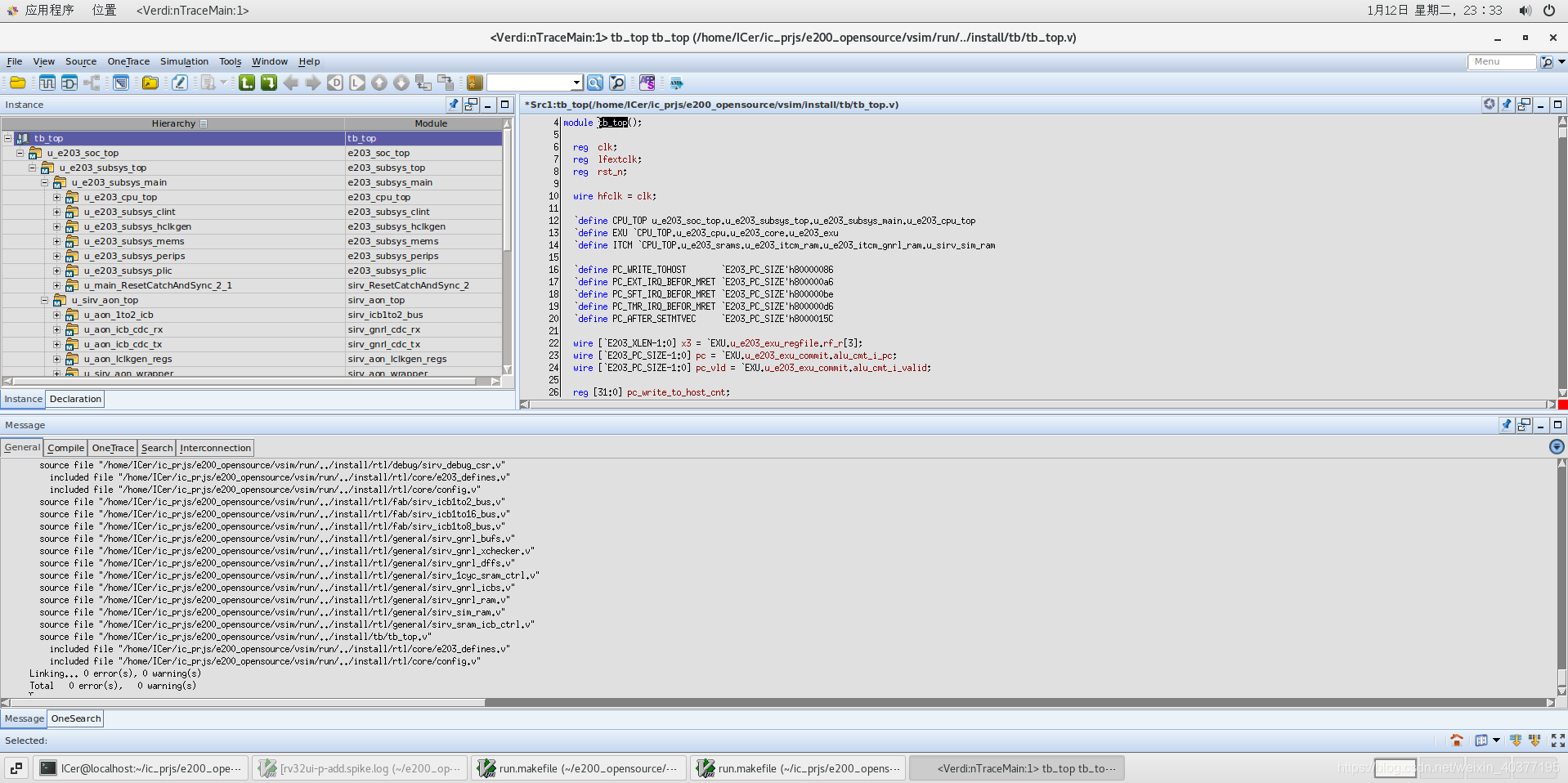
5.运行仿真
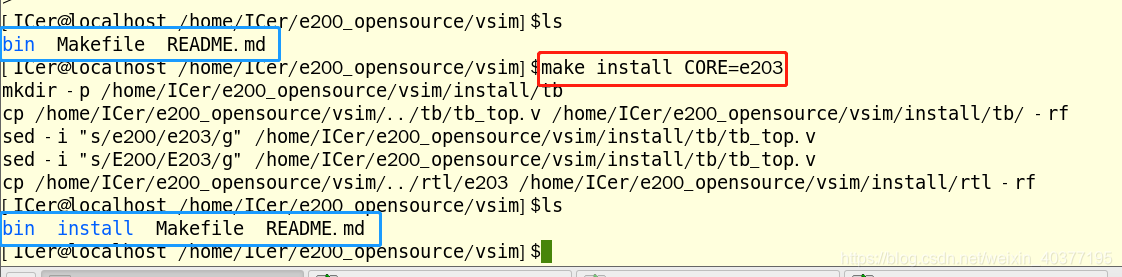
make install CORE=e203
make compile
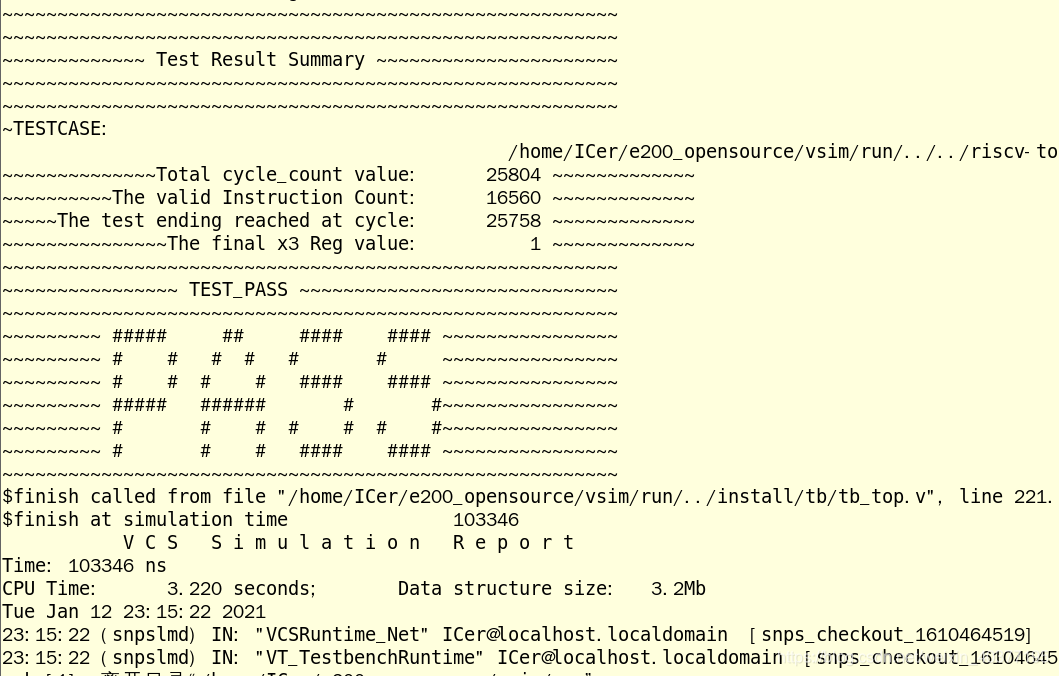
make run_test
make wave
make install CORE=e203
make compile
make run_test
make wave
6.总结
L
LANxg1951 天前 ·
1 楼
回复 我也不知道:
后来github这个项目的脚本更新了不一样了,能重新给个教程吗大佬
v2移植基本一样,我现在也移植好一份工程,还是在gitee,可以去看一下
💡 请 登录 后参与讨论(微信扫码即登录/注册)
帖子信息
版块开源蜂鸟E203
回复2
浏览8923
发布2021-04-18 12:21